Reference: every stage
Answers: what are the stages? what moves a case to each one? what is the sentence at each stage? where do I see a case's stage?
The stage is where a case is. It moves when the customer signs up, uploads, signs or books; when you upload a file, type a number or a date, or pick a Send switch; or when a clock runs out. Each stage has one sentence. pdrOS writes it into Case status (folder CASE on the customer's contact profile), and Sarah reads it to a customer who asks.
Where to see the stage
Every case at once: In the left menu, click Repair Stages. At the top left, pick the pipeline APPRAISAL CASES. Each open case is a card in the column of its stage, 1.1 to 6.3. Look only: never drag a card; pdrOS moves them. You are in the right place when you see columns of cards headed 1.1 to 6.3.
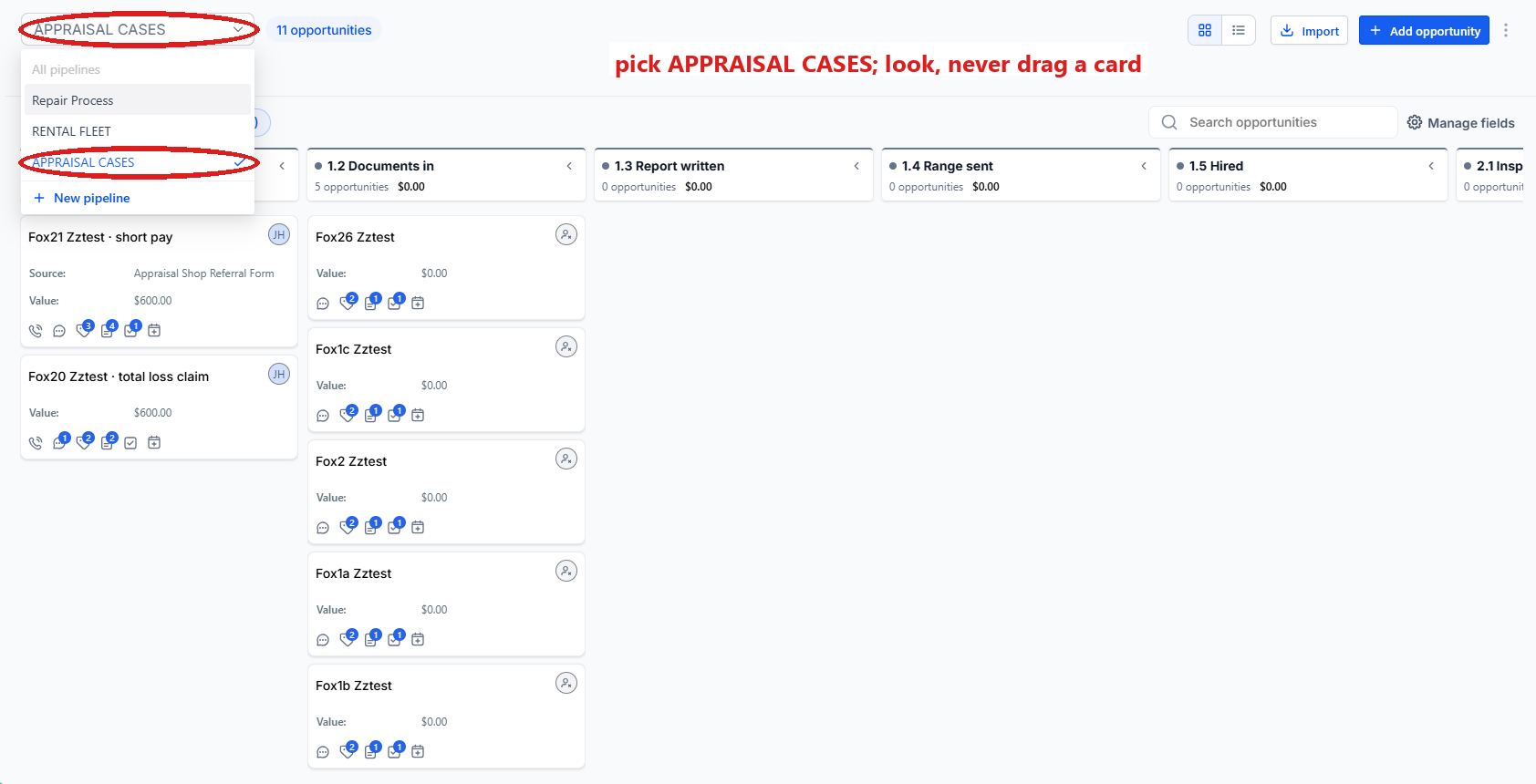
One case:
- In the left menu, click Contacts.
- Click in the search box at the top of the list and type the customer's last name or RO number (your case number).
- Click the customer's name in the list. You are in the right place when you see the customer's name at the top left and their texts in the middle.
- On the left side, scroll down to the folder CASE and click the folder's name to open it.
- Read Case status: its sentence matches a stage in the table below.
The stages
| Stage | Name | Reached when | Sentence to the customer |
|---|---|---|---|
| 1.1 | New case | Signup; also after a cancelled or missed inspection | Case opened. We have sent you what we need from you to get started. |
| 1.2 | Documents in | The customer's documents are in (on a short pay, both estimates) | We have your documents and are working on the valuation. |
| 1.3 | Report written | Your report or rewrite is uploaded to Upload Estimate Doc Here (folder Estimates) | Our report is written. John Hayduk is finalizing the range to send you. (short pay: Our rewrite is done; the agreement is on its way to you to sign.) |
| 1.4 | Range sent | Send range (folder CASE) | We sent you our valuation and the agreement link. We are waiting for you to sign. |
| 1.5 | Hired | The agreement is signed | Agreement signed. We are preparing the demand to [insurer]. |
| 2.1 | Inspection booked | A booking lands | Your inspection is booked for [date time] at our office. |
| 2.2 | Inspection report sent | The inspection report is uploaded to Upload Estimate Doc Here (folder Estimates) | Your inspection report was emailed to you. We are waiting to hear whether you want the report only or want us to take it on. |
| 3.1 | RTA or demand sent | Send demand (folder CASE) | Insured: The demand for appraisal went to [insurer] on [date]. Their appraiser has seven to ten business days to contact us (day 10 on the calendar). Claimant: Our demand went to [insurer] on [date]. We follow up if they go quiet. |
| 3.2 | Other appraiser in contact | Other appraiser contact date (folder CARRIER & APPRAISER) | The insurer's appraiser is in contact. The two appraisers are exchanging reports. |
| 3.3 | Report out | Send our report (folder CASE) | Our report went to their appraiser on [date]. We are waiting on theirs and follow up at day ten. |
| 4.1 | Their report or offer in | Their number (folder CARRIER & APPRAISER) or their report in Supplement #1 Upload Doc Here (folder Supplements) | The other side has answered with their figure. We are reviewing it. |
| 4.2 | Negotiating | Send counter (folder CASE) | We are negotiating. Our latest counter went out on [date]. |
| 4.3 | Umpire | Umpire = Called (folder CARRIER & APPRAISER) | The case is with the umpire. We are waiting on the decision. |
| 4.4 | Pre-court | Tortfeasor letter sent date (folder CARRIER & APPRAISER) | We are preparing for court. |
| 5.1 | Award signed or settled | Award amount + Award signed date (folder OUTCOME) | Settled. [Insurer] will contact you for the paperwork and pays you directly. Your settlement summary is on its way. |
| 5.2 | Summary sent | Send summary (folder CASE) | Settled. Your settlement summary was emailed to you. |
| 6.1 | Fee due | Any Outcome on a hired case while Fee paid (folder CASE) is still No | Settled. Our invoice is still open; it is in your email. |
| 6.2 | Outcome pending | Outcome (folder OUTCOME) Court, Counteroffer pending or Carrier review report received | We are waiting to hear how the claim ended. Tell us any time. |
| 6.3 | Closed | Outcome set and Fee paid not No (a case the customer never signed closes on any Outcome) | Closed. Thank you. |
Stages 4.1 and 4.2 swap back and forth round after round; nothing else moves backwards except the inspection reset to 1.1.
Did this page not match what you see? Ask the support chat or open a support ticket. We change the page, not you.