Texts to your phone: what each alert means
Answers: what does this text on my phone mean? what do I do about it? how do I get from the text to the customer?
Your phone gets a text only for things that cannot wait. Each starts with "pdrOS:" and names the customer and their RO number (your case number), written "case #1007". When a task goes with it, the text says "Task created".
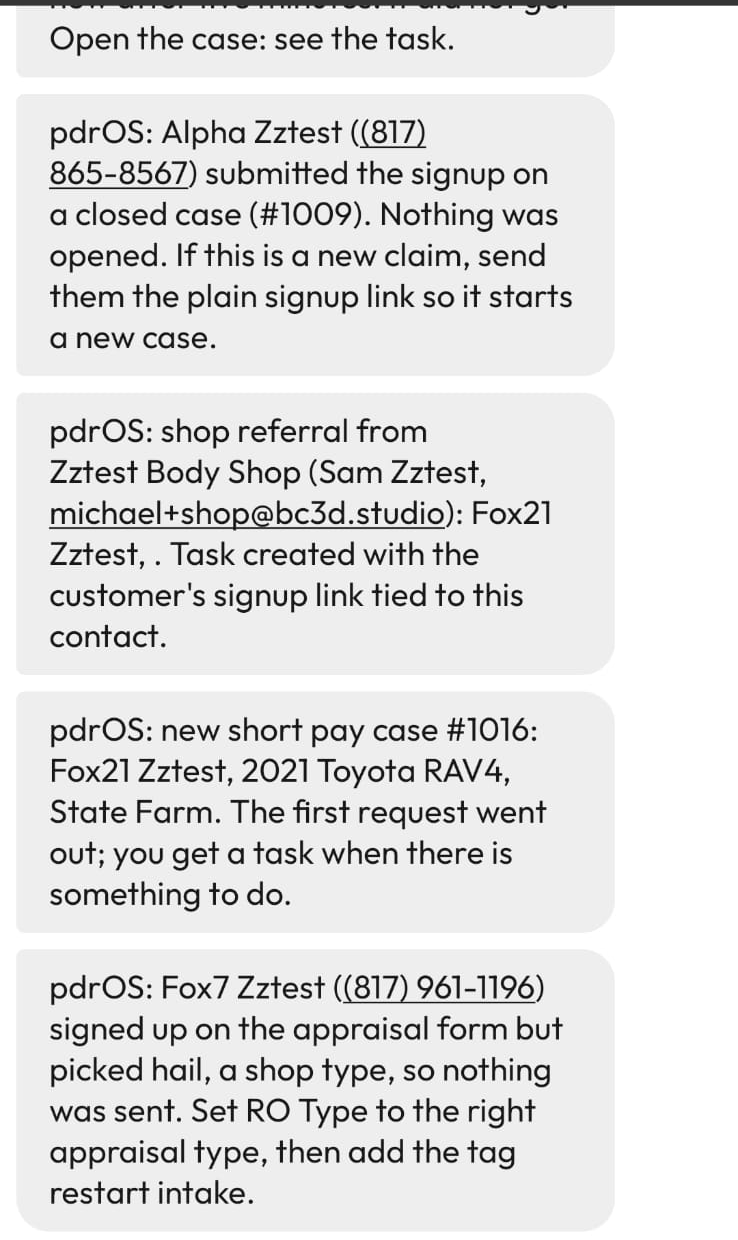
From the text to the customer
The text names the customer and the case number. To act on it at your computer:
- In the left menu, click Contacts.
- Click in the search box at the top of the list and type the customer's last name or the case number.
- Click the customer's name in the list. Their contact profile opens.
You are in the right place when you see the customer's name at the top left and their texts in the middle.
When the text says "Task created", you can start from the task instead. In the left menu, click Tasks, click the task's row, then click Open Full View.
The Do column below gives the short route for each text. Contacts → the customer means the three steps above. "The middle" is the middle of the contact profile, with the customer's texts and emails; "the message box" is at its bottom.
New business
Arrows mean: click this, then this.
| Text says | Means | Do |
|---|---|---|
| new [type] case #N: NAME, vehicle, insurer. The first request went out | A signup landed and the welcome and documents request went. | Nothing yet; a task comes when there is something to do. |
| shop referral from SHOP: NAME, phone. Task created with the customer's signup link | A shop referred someone. | Call them. Fill the signup with them from the link in the task: Tasks → the task → Open Full View → the signup link in the task. |
| NAME, referred by SHOP 3 days ago, has not started the signup. Give them a call | Three days, no signup. | Call. |
| a text from (phone), who is not on any case. They were asked for their name and vehicle… To open their case on this same contact, use: [link] | A stranger texted the 610 number. Sarah asked who they are. | Read it: Conversations → Unread → their phone number. If it is a new customer, call them and fill the signup with them from that link in the text. It lands on the same contact profile. |
| NAME signed up on the appraisal form but picked hail, a shop type, so nothing was sent | Wrong type on the form. | Contacts → the customer → folder REPAIR STATUS → RO Type → the right appraisal type → the blue Save button. Then tell us: Support → the orange Support Ticket button → the RO number and "please restart the intake". We do it within the hour. |
| NAME submitted the signup on a closed case (#N). Nothing was opened | A past customer used their old link. | If it is a new claim, send them the plain signup link (Your three links): Contacts → the customer → the message box → SMS → paste the link alone → the paper-plane button. |
| the intake for NAME did not finish: no file number or upload link after 10 minutes | The signup did not finish: no RO number (the text says "file number") and no upload link after 10 minutes. | Tell us: Support → the orange Support Ticket button → the customer's name and "the intake did not finish, please fix it and restart the intake" (Getting help). We do it within the hour. |
Progress on a case
Arrows mean: click this, then this.
| Text says | Means | Do |
|---|---|---|
| NAME signed the [type] agreement (case #N). The fee invoice is going out | Signed. | Task: Send the demand. Tasks → the task → Open Full View. |
| short pay #N for NAME has both estimates. Please enter the shop's estimate in CCC1 (to Sharon's phone) | Both estimates in. | Sharon's task: Tasks → the task → Open Full View. |
| the rewrite for NAME is in and the agreement went | Your rewrite reached the owner with the agreement link. | Wait for the signature. |
| the other appraiser's report is in on NAME. Type Their number when you have read it | Their report landed. | Read it: Contacts → the customer → folder Supplements → click the file's name in Supplement #1 Upload Doc Here. Then folder CARRIER & APPRAISER → Their number: type it → the blue Save button. |
| the other side answered on NAME: $X. You are at $Y. Task created: negotiate | Their figure. | Counter. The task has the steps: Tasks → the task → Open Full View. |
| new figure from the other side on NAME: $X | A later round. | Counter: Contacts → the customer → folder CARRIER & APPRAISER → Counteroffer: type it → the blue Save button. Then folder CASE → Send counter → Send it now → the blue Save button. |
| Pat Smith replied by email about one of your cases. Open Conversations → Pat to read it | The adjuster or appraiser answered an email. | Read it in their conversation: Conversations → Unread → the name in the text. |
Something is late
Arrows mean: click this, then this.
| Text says | Means | Do |
|---|---|---|
| no contact from [insurer]'s appraiser in 7 business days on NAME | Clock A ran out (day 10 after the RTA). | Call the carrier (task: Tasks → the task → Open Full View). |
| day 22 and still no report from [appraiser] on NAME. Two chase emails went | Clock B ran out (the wait for their report after yours went). | Call them or the umpire (task: Tasks → the task → Open Full View). |
| three demand chases to [insurer] on NAME got no answer | Claimant demand ignored three times. | Call the adjuster's supervisor (task: Tasks → the task → Open Full View). The customer is asked how it stands. |
| no answer in 7 days to your counter of $X on NAME | Silence after a counter. | Call, or Contacts → the customer → folder CARRIER & APPRAISER → Umpire → Called → the blue Save button. |
| demand-by date in 14 days on NAME: DATE / 3 days left before a deadline on NAME | Your deadline is near. | A demand-by date: send it: Contacts → the customer → folder CASE → Send demand → Send it now → the blue Save button. A statute deadline: see the next row. |
| statute deadline in 14 days on NAME: DATE. If it goes to court it must be filed by then | Statute near. | Decide with the customer: file in court before that date, or close the case. Your task has the steps: Tasks → the task → Open Full View. |
| the fee on NAME is still unpaid after 14 days. The invoice keeps reminding them | Fee open two weeks after settlement. | Call if you want; the invoice keeps reminding. |
| a Send switch on NAME still says Send it now after five minutes. It did not go | A setting was swallowed, or the case is closed. | On a closed case, do nothing: switches do not work there. Otherwise, set it again: Contacts → the customer → folder CASE → the switch that reads Send it now → Not sent (see task) → the blue Save button. Wait one minute. Then the same switch → Send it now → the blue Save button. Do not pick I sent it myself as the reset (it records the email as sent by you); pick it only if you really sent the email yourself. |
Inspections
Arrows mean: click this, then this.
| Text says | Means | Do |
|---|---|---|
| NAME arrives at DATE TIME and has not signed the agreement. Have them sign on your phone: [link] | One hour before the visit, unsigned. | Open the link on your phone when they arrive. |
| NAME cancelled or missed the inspection (case #N). They were sent the booking link again | Cancel or no show. | Nothing; they rebook. Call if you like. |
| NAME (phone) booked an inspection but has no appraisal case. Open their contact and send them the Appraisal Case Signup link | Someone booked without a case (a new name typed into the calendar). | Send them the signup link (Your three links): Contacts → the name in the text → the message box → SMS → paste the link alone → the paper-plane button. |
Customers who need a person
Arrows mean: click this, then this.
| Text says | Means | Do |
|---|---|---|
| URGENT "refund" from NAME, case #N. Read their message and call them now | They wrote refund. | Read it: Contacts → the customer → the middle. Call now. |
| An office text that a customer is unhappy (to Sharon's phone; the task is URGENT · unhappy customer · call within the hour · NAME) | Complaint. | Sharon calls within the hour. Her task has the steps: Tasks → the task → Open Full View. |
| An office text that a customer asked Sarah something she does not answer (to Sharon's phone; the tasks are Customer has a money question, Customer wants a date or an update, Customer gave new contact or case details, Customer asked for a document, Sarah needs a person, each · NAME) | Sarah routed a question. | Sharon's task: Tasks → the task → Open Full View. John answers figures. |
| Sarah handed NAME to you (vehicle, type). The bot is asleep on it for 8 hours. Their last message is in the case conversation | Handover: they asked about an offer, a release, the umpire, court or a deadline, or asked for a person. | Reply yourself: Conversations → Unread → the customer → the message box at the bottom of the middle. |
| missed call from (phone), not on an open case. Nothing was sent to them | A stranger called the 610 number. | Call back if you want. (A customer with an open case gets a "sorry we missed your call" text and a note; you get nothing.) |
Did this page not match what you see? Ask the support chat or open a support ticket. We change the page, not you.