Other endings: the Outcome list
Answers: how do I close a case that did not settle? how do I set Outcome? what do Withdrawn, Went quiet, Court, Counteroffer pending do?
Outcome is how a case ended. pdrOS writes Settled and Report only for you; you pick the others. Some close the case, some keep it open and ask the customer how it went.
Set the Outcome
- In the left menu, click Contacts.
- Click in the search box at the top of the list and type the customer's last name or RO number (your case number).
- Click the customer's name in the list. Their contact profile opens. You are in the right place when you see the customer's name at the top left and their texts in the middle.
- On the left side of the contact profile, scroll down to the folder OUTCOME and click the folder's name to open it. (If you already see its fields, it is open: clicking its name again closes it.)
- Click the box under Outcome ⚡ and pick the ending from the list. The table below says what each one does.
- Click the blue Save button at the bottom of the left side.
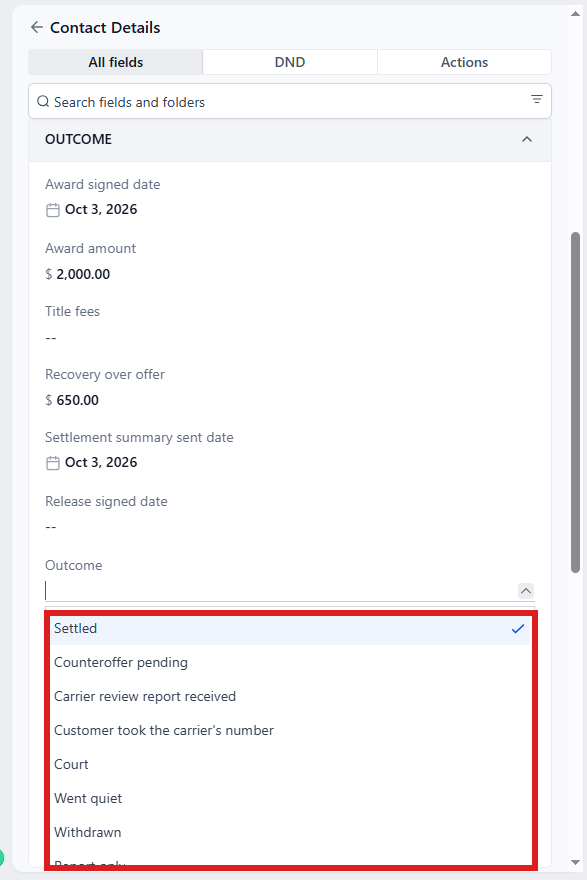
| Outcome | What it means | What pdrOS does |
|---|---|---|
| Settled | Agreed or awarded. | Written by pdrOS when the summary goes (short pay and inspection: when the award is typed). Then pdrOS checks Fee paid: if it is No, you get the task Fee not paid · NAME; if it is paid, the case closes, with the review ask. |
| Report only | Inspection customer wanted the report and nothing more. | Written by pdrOS when you set Engaged against to None. Then pdrOS checks Fee paid: if it is No, you get the task Fee not paid · NAME; if it is paid, the case closes, with the review ask. |
| Withdrawn | The customer pulled out. | Closes. No fee task if never hired; no review ask. |
| Customer took the carrier's number | They accepted the insurer's offer against advice. | Closes. |
| Went quiet | No documents, no answers, nothing after the reminders. | Closes. |
| Court | The customer is taking it to court. | Does not close. Stage 6.2 Outcome pending. No asks go to the customer; the case waits until you set a final outcome. |
| Counteroffer pending | A counter is out and the customer is deciding or waiting. | Does not close. Stage 6.2; the same asks. |
| Carrier review report received | The carrier sent its review; waiting on their move. | Does not close. Stage 6.2; the same asks. |
A hired case (the customer signed the agreement) whose Fee paid is still No does not close on any Outcome. It waits at 6.1 Fee due with the task Fee not paid · NAME until you set Fee paid (Step 10: the fee and the close).
The outcome asks
For Counteroffer pending and Carrier review report received, pdrOS texts and emails the customer "How did your claim end up?". Court sends no asks: the case waits for you. The asks go on days 30, 60, 90 and 120 after you set the outcome, then on days 210 and 300. After the day-300 ask with no answer you get the task No answer for a year · close it? · NAME. The asks stop the moment you set a final outcome, or when their figure or report comes in on the case.
When that task comes:
- Call the customer and ask how it ended.
- In the left menu, click Contacts.
- Click in the search box at the top of the list and type the customer's last name or RO number.
- Click the customer's name in the list. Their contact profile opens. You are in the right place when you see the customer's name at the top left and their texts in the middle.
- On the left side of the contact profile, scroll down to the folder OUTCOME and click the folder's name to open it.
- Click the box under Outcome ⚡ and pick the final ending from the list.
- Click the blue Save button at the bottom of the left side.
- In the left menu, click Tasks. My Tasks opens. You are in the right place when you see the boxes Overdue, Due Today, This Week and Completed at the top.
- Click the row No answer for a year · close it? · NAME (click Due Today or Overdue at the top if you do not see it). A short preview opens under it.
- Click Open Full View.
- Click the green Mark Complete button at the bottom right of the full view.
If the task is already gone when you come back, pdrOS closed it because the step happened.
Changing your mind
Pick a different Outcome, then click the blue Save button at the bottom of the left side. If the case is still open, a closing outcome (Withdrawn, Went quiet, Customer took the carrier's number) closes it. A pending one (Counteroffer pending, Carrier review report received) starts the asks again; Court waits for you. A hired case with Fee paid at No waits for the fee first. If the case has already closed, changing Outcome does not reopen it; tell us (see below).
- In the left menu, click Contacts.
- Click in the search box at the top of the list and type the customer's last name or RO number.
- Click the customer's name in the list. Their contact profile opens. You are in the right place when you see the customer's name at the top left and their texts in the middle.
- On the left side of the contact profile, scroll down to the folder OUTCOME and click the folder's name to open it.
- Click the box under Outcome ⚡ and pick the new ending from the list.
- Click the blue Save button at the bottom of the left side.
Fee first or outcome first
Either order works. Fee paid before the outcome is simply recorded. The close happens when both are there.
If something looks wrong
If you set the wrong Outcome and the case closed, then a closed case stays closed. Tell us the RO number (in the left menu, click Support, then the orange Support Ticket button); we reopen it on our side. To find the RO number:
- In the left menu, click Contacts.
- Click in the search box at the top of the list and type the customer's last name.
- Click the customer's name in the list. Their contact profile opens. You are in the right place when you see the customer's name at the top left and their texts in the middle.
- At the top of the left side, under Tags, read the number next to RO# DO NOT EDIT THIS!!. pdrOS sets it; never change it.
If the customer answers "it settled" to the outcome ask, type the Award amount and pick the Award signed date. Or pick Settled in Outcome: the asks stop, but on a total loss or diminished value the case still waits for the summary (Step 9).
- In the left menu, click Contacts.
- Click in the search box at the top of the list and type the customer's last name or RO number.
- Click the customer's name in the list. Their contact profile opens. You are in the right place when you see the customer's name at the top left and their texts in the middle.
- On the left side of the contact profile, scroll down to the folder OUTCOME and click the folder's name to open it.
- Click in the box under Award amount and type the amount (numbers only, no dollar sign).
- Click the box under Award signed date and pick the day in the calendar that opens.
Or, instead of steps 5 and 6: click the box under Outcome and pick Settled from the list. 7. Click the blue Save button at the bottom of the left side.
pdrOS also marks the closed case on the case board: won (settled, report only), lost (withdrawn, took the carrier's number) or abandoned (went quiet). You do nothing there. To see the board: in the left menu, click Repair Stages, then pick the pipeline APPRAISAL CASES at the top left. Look only: never drag a card; pdrOS moves them.
Did this page not match what you see? Ask the support chat or open a support ticket. We change the page, not you.