Shop referrals: when a body shop sends you a customer
Answers: a shop sent me a customer, what happens? what do I do with the Call the referred customer task? where is the referred customer's own signup link?
A shop fills the short referral form with the customer's name and phone and what happened. pdrOS emails the customer a welcome with their own signup link and gives you the task "Call the referred customer".
What the shop does
The shop has the referral link (Appraisal Shop Referral Form). They type the shop name, their contact, the shop email, the customer's name, phone and email, and a line on what happened. Thirty seconds.
What pdrOS does, within a minute
- Makes the customer's contact profile, tagged as a shop referral, assigned to you.
- Emails the customer: "[Shop] asked us to help with your claim", with their own signup link.
- Texts you: "shop referral from SHOP: NAME, phone. Task created with the customer's signup link".
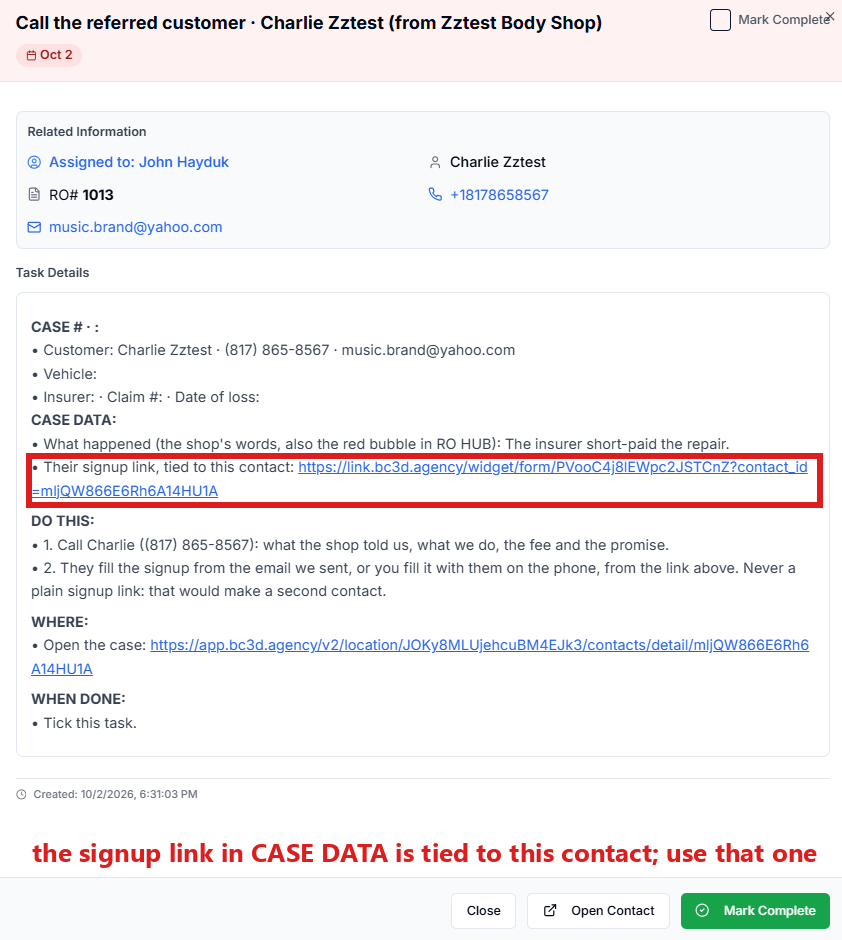
- Gives you the task Call the referred customer · NAME (from SHOP) with the shop's words and the link.
- Waits three days for the signup. If nothing comes, you get "NAME, referred by SHOP 3 days ago, has not started the signup. Give them a call".
What you do
- Call the customer: what the shop told you, what you do, the $600 fee and, on a total loss, the $700 promise (the fee comes back if the final value is not at least $700 over the offer).
- Either they fill the signup from the email, or you fill it with them on the phone from the link in the task (steps below). That link is tied to their contact profile, so the signup lands on their own contact profile.
- Never send them the plain signup link: it would make a second contact profile for the same person.
- When you have called them, mark the task complete (steps below).
Fill the signup from the task
- In the left menu, click Tasks. My Tasks opens. You are in the right place when you see the boxes Overdue, Due Today, This Week and Completed at the top.
- Click the row of the task Call the referred customer · NAME (from SHOP). A short preview opens under it.
- Click Open Full View. The whole task shows, with the shop's words and the customer's signup link.
- Click the customer's signup link in the task. Their signup form opens, already tied to them. You are in the right place when you see the boxes First Name, Last Name, Email and Phone at the top.
- Fill the boxes with them as you talk. Every box is explained in The signup form.
- Ask "OK to text you updates?" and check the consent box only if they say yes.
- Click Submit at the bottom of the form.
Mark the task complete
- In the left menu, click Tasks.
- Click the row of the task Call the referred customer · NAME (from SHOP). A short preview opens under it.
- Click Open Full View.
- Click the green Mark Complete button at the bottom right.
If the task is already gone when you come back, pdrOS closed it because the step happened.
After the signup
The case runs as its type from there: the short pay path (the shop gets the upload email) or any other type you picked.
Did this page not match what you see? Ask the support chat or open a support ticket. We change the page, not you.