A text from someone with no case
Answers: someone texted the office with no case, what now? how do I start their case without a duplicate? an existing customer texted from a new phone, how do I change their number?
When a number that is not on any case texts the 610 number, pdrOS answers for you once and sends you the signup link for that same person.
What they get
"Thanks for your message to Collision Safety Consultants of PA. So we can find your file, please reply with your full name and the vehicle. We will get back to you shortly."
Sarah does not chat with them; she only works for customers with a case.
What you get
A text: "a text from (phone), who is not on any case. They were asked for their name and vehicle; read it in Conversations. To open their case on this same contact, use: [link]".
If they text again before you act, you get the alert again but they are not asked a second time.
What to do
First, read what they wrote
- In the left menu, click Conversations.
- At the top of the list of people, click Unread.
- Click the row that shows their phone number (they have no name yet). Their thread opens in the middle. You are in the right place when you see their text and our reply asking for their name and vehicle.
If they are a new customer
- Call them.
- On your phone, open our alert text and tap the link at its end. It opens the signup form already tied to that person, so their case opens on the same contact profile with their number.
- Fill the boxes with them as you talk. Every box is explained in The signup form.
- Ask "OK to text you updates?" and check the consent box only if they say yes.
- Tap Submit at the bottom of the form.
Never make a second contact profile for them.
If they are an existing customer texting from a new phone
Put the new number on their existing contact profile, then reply there.
- In the left menu, click Contacts.
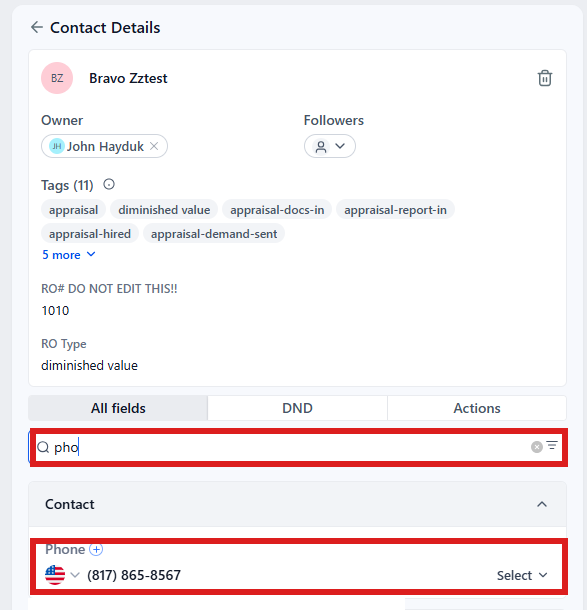
- Click in the search box at the top of the list and type the customer's last name or RO number (your case number).
- Click the customer's name in the list. Their contact profile opens. You are in the right place when you see the customer's name at the top left and their texts in the middle.
- On the left side of the contact profile, click the folder Contact to open it.
- Click in the box with their phone number and delete the old number.
- Type the new number with the area code.
- Click the blue Save button at the bottom of the left side.
- At the bottom of the middle of the contact profile is the message box. At its left end, click the small button with a down arrow and pick SMS.
- Click in the box and type your reply.
- Click the paper-plane button at the right end to send.
Their text also made a nameless contact profile. Tell us (in the left menu, click Support, then the orange Support Ticket button), and we remove it.
If it is spam
Ignore it.
Never answer by sending them the plain signup link: that makes a second contact profile and splits their messages.
Did this page not match what you see? Ask the support chat or open a support ticket. We change the page, not you.